Watch the walkthrough
Why it matters
Your phone numbers carry your business's reputation with the carriers. When AT&T, Verizon or T-Mobile blocks a number, the person you call never hears it ring. When carriers filter a number's texts, they never arrive. Either way, every call and text from that number is wasted, and nothing on screen used to say so.
Open Phone Health
- In the dock, click More, then Contact Center.
- In the left rail, click Phone Health (the last section).
- Pick 14 days or 30 days. Click Refresh any time; the line beside it says how fresh each source is.
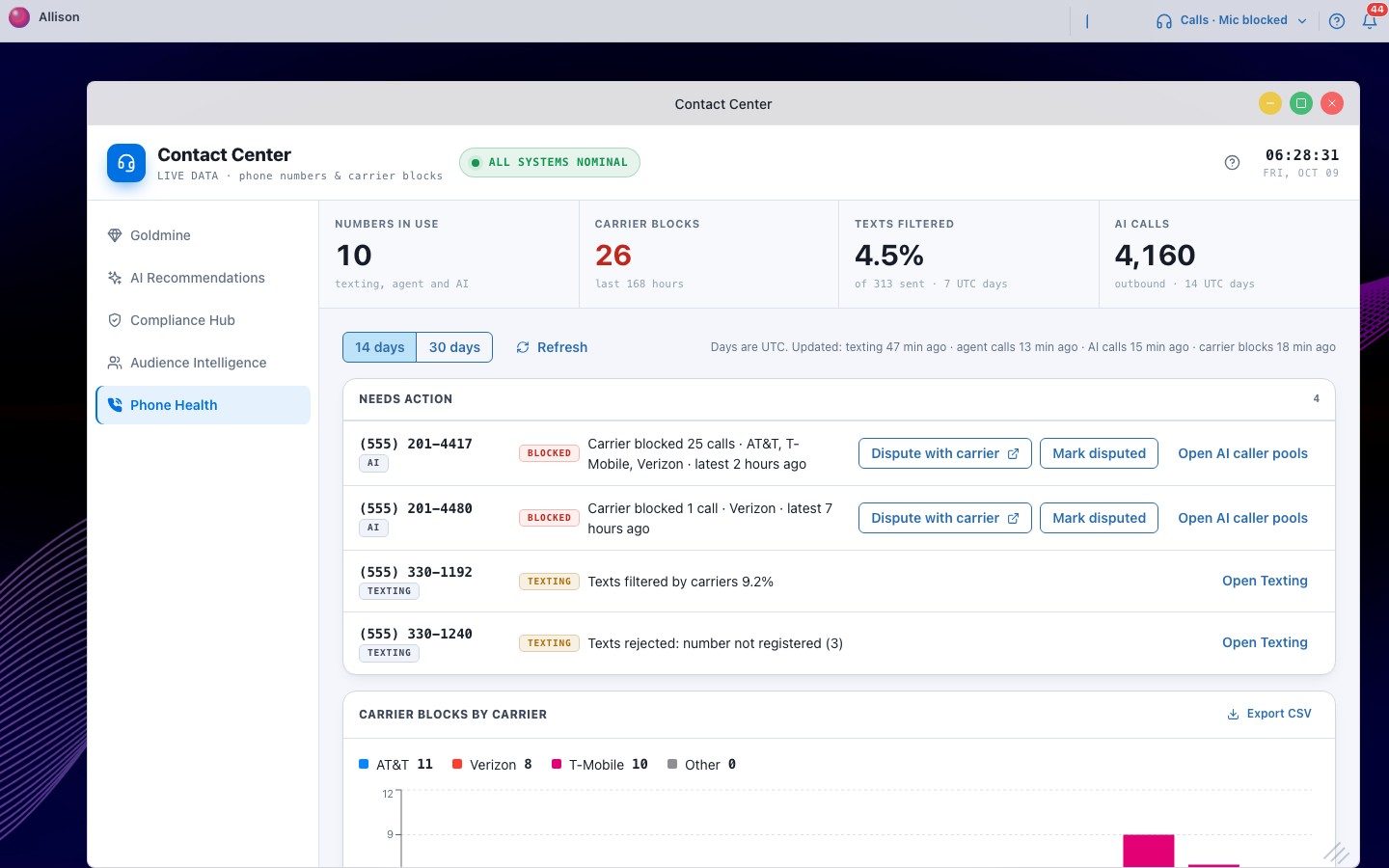
Owners, admins and managers see it in the dock. Agents don't.
The four tiles
| Tile | What it counts |
|---|---|
| Numbers in use | Every number you text or call from: texting, your team's calls and AI calls, plus numbers on your account. |
| Carrier blocks | Calls a carrier confirmed it blocked, in the last 168 hours (7 days back from now). |
| Texts filtered | The share of texts carriers filtered in the last 7 days. Shows "—" until texting health is turned on in Number Rotation. |
| AI calls | Outbound AI calls in the period. The same figure as Voice AI analytics. |
A dash (—) always means there's no data for that figure. It never means zero.
Needs action
Only numbers with a problem appear here, worst first. Each row says why it's listed.
| Reason | When it shows | Next step |
|---|---|---|
| Carrier blocked N calls | At least one confirmed carrier block in the last 168 hours. | Dispute with the carrier, mark it disputed, and stop dialing from it for now. |
| Texts filtered by carriers N% | More than 5% of texts filtered, with at least 25 sent in the last 7 days. | Check message content and volume per number; park the number in Number Rotation if it keeps happening. |
| Texts rejected: number not registered | Any text rejected because the number isn't on an approved texting registration (last 7 days). | Ask us to add the number to your texting registration. |
Dispute a block, then mark it disputed
- On a blocked number, click Dispute with carrier. It opens that carrier's own dispute page (AT&T, Verizon or T-Mobile). File it there.
- Back in Phone Health, click Mark disputed. Pick the carrier and, if you like, add a note such as your ticket number. Click Save.
- The row now shows Disputed, the carrier, when you filed, and how many blocks happened since. If that number stays at zero, the dispute worked.
- When the carrier answers, click Resolve and choose Carrier unblocked it, Still blocked or Withdraw dispute.
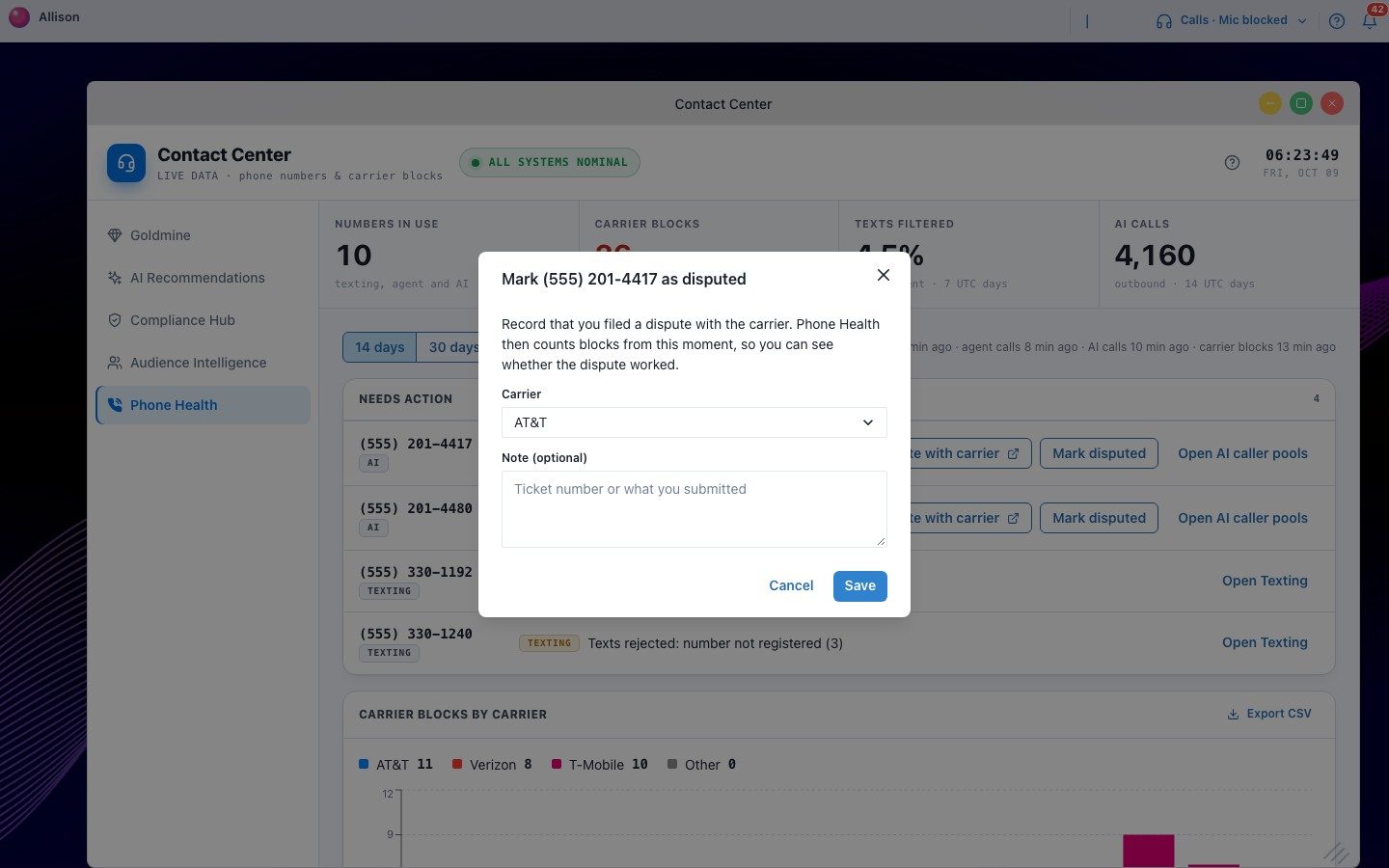
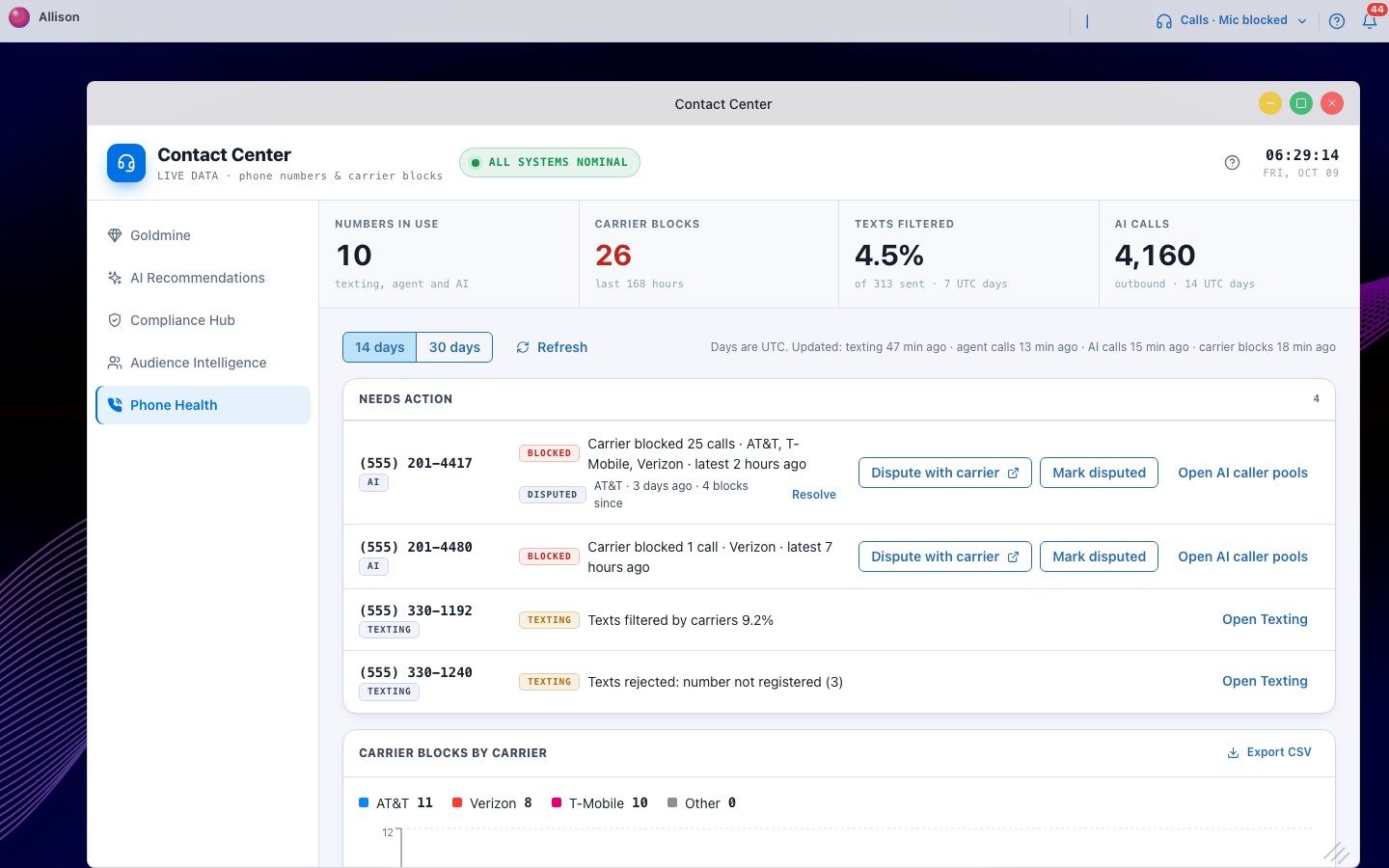
Only owners, admins and managers can mark or resolve a dispute. Marking twice doesn't create a second record.
Report blocks by carrier
Carrier blocks by carrier shows confirmed blocks for each day, stacked by AT&T, Verizon, T-Mobile and other carriers, with the totals above the chart. Export CSV downloads exactly those rows: one line per day, number and carrier, with the time of the latest block and the dispute link.
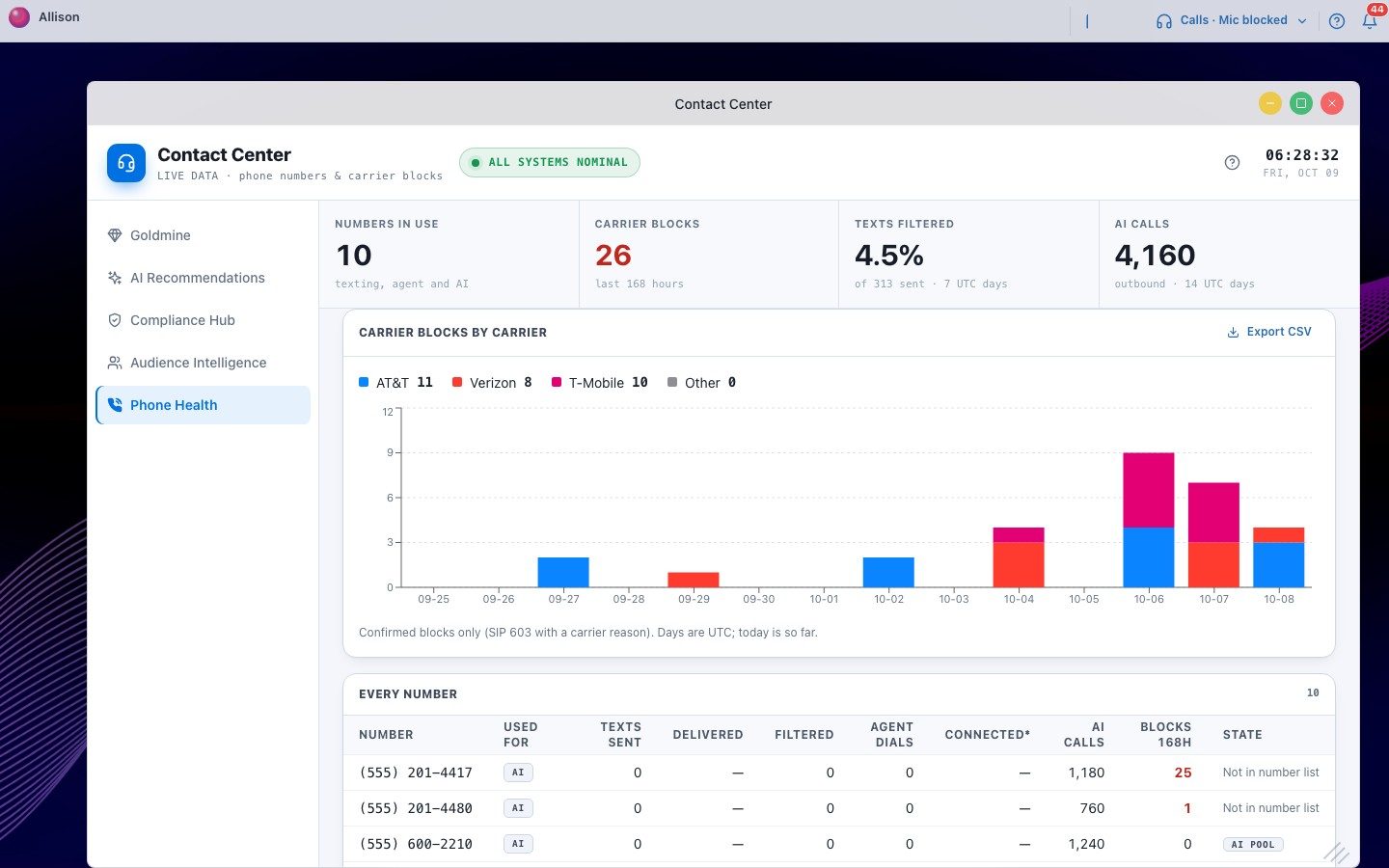
Days are UTC, and today counts only what has happened so far.
Every number
A row for every number with its activity for the period: texts sent, delivered and filtered, agent dials and connected calls, AI calls, and blocks in the last 168 hours. Used for shows whether it texts, makes agent calls or makes AI calls. Not in number list means a number placed calls (usually AI calls) but isn't in your workspace's number list. It's shown anyway so a block on it isn't missed.
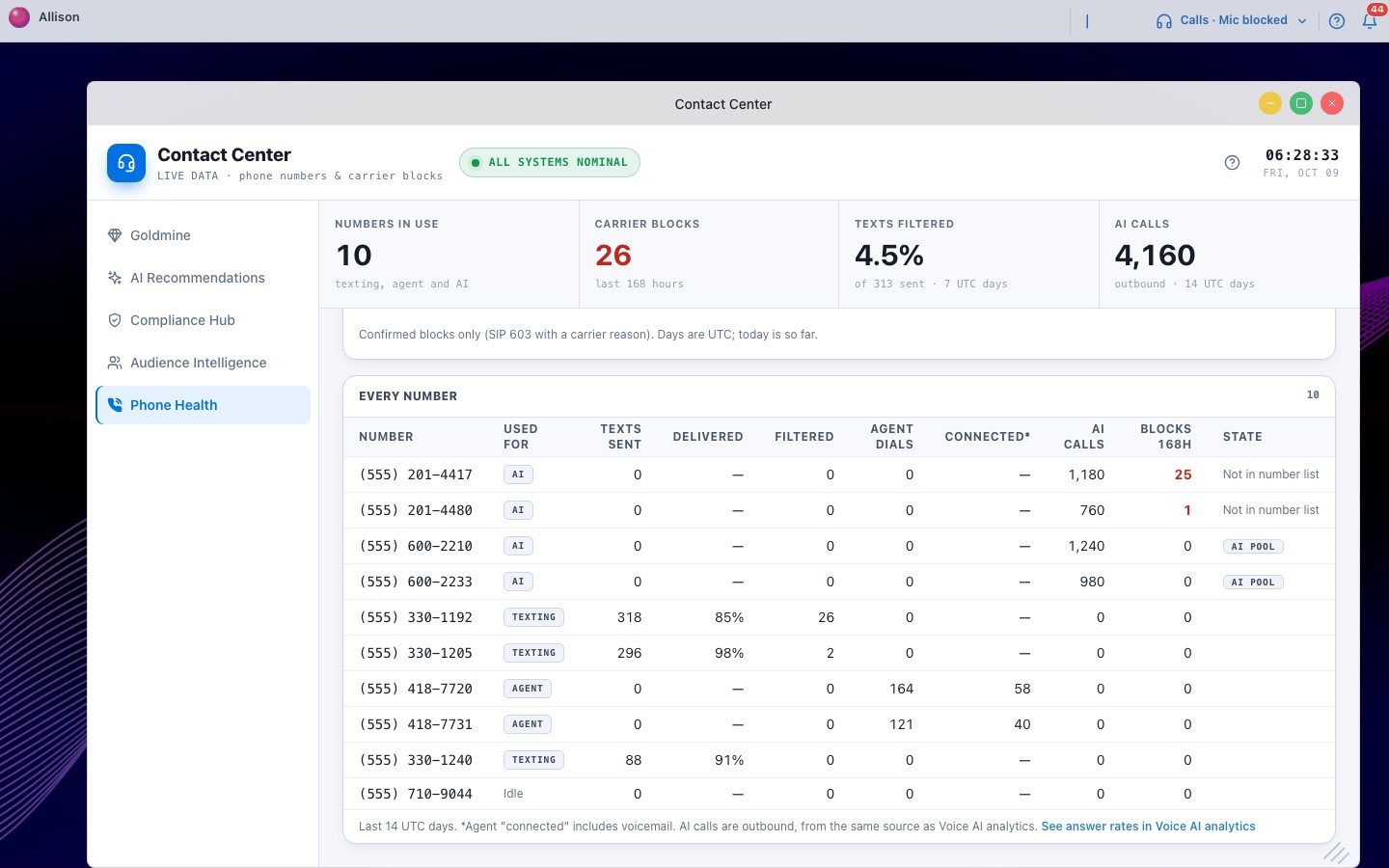
For AI answer rates, click See answer rates in Voice AI analytics under the table. It opens Analytics on the Voice AI view in a new tab.
Will this number show in Needs action?
Enter what you see for one number over the last 7 days.
Verified caller ID (STIR/SHAKEN)
Carriers rate every call by how well the caller is verified. A call from a number registered to your verified business gets the top rating, called A attestation. Unverified calls get a lower rating and are more likely to be labeled "Spam Likely" or blocked. Registering won't stop every block, but it removes one of the most common reasons for them.
- Create a Business Profile in your Twilio account's Trust Hub: legal business name, EIN, business address, website and an authorized contact. Review usually takes about a day.
- Create a SHAKEN/STIR registration under that profile and add the numbers you call from. Review usually takes about three days.
- Optional: Voice Integrity. This registers your numbers with the carriers' spam engines so they know the calls are yours.
Weekly routine (5 minutes)
- Open Phone Health and read Needs action top to bottom.
- For each blocked number, file and mark the dispute. Stop dialing from it until blocks since filed stay at zero.
- For filtered or unregistered texting numbers, check content and volume, and ask us about registration.
- Once a month, export Carrier blocks by carrier for your team or owner report.
Troubleshooting
| What you see | What it means |
|---|---|
| Texting columns show "—" | Texting health isn't on for your workspace. Use Turn it on in Number Rotation above the table. |
| AI calls says "incomplete data" | AI call totals for this period are still being computed. Try again later, or pick 14 days. |
| "Last phone-account check failed" | Our last check of your phone account was refused. Reconnect your phone account or check its billing. |
| No "Mark disputed" button | Only owners, admins and managers can record disputes. |
| A number shows "Not in number list" | It made calls but isn't in this workspace's number list. It's listed so a block on it isn't missed. |
Questions
Does Phone Health change anything on its own? No. It never parks a number or changes a pool. You decide, in Number Rotation.
How fresh is it? Carrier blocks are checked about every 15 minutes. Texting and AI call totals refresh several times a day. Each source shows "Updated … ago".
Where do carrier blocks come from? From your phone provider's own call reports. Read the Carrier Block Detection guide for how a blocked call is detected.